5/26/2019

Git - How to validate commit messages?

Last time I wrote an introduction to GIT for beginners. This time I would like to give a solution on a bit advanced problem in GIT. I had to solve to following issue: all commit messages needs to follow some specific rules (maximum length of line etc.) and no commit should be able to be pushed if its commit message does not fulfill these rules.
I thought there should be an easy solution for this problem and for sure a lot of people already solved it, since validation of commit messages should be needed for several projects. In fact it was not so easy. Let me describe why!

Git commit hooks

In GIT you can specify so called commit hooks. These are scripts which are called in case of specific actions. There are commit hooks which are running on “client” side and the are hooks running on “server” side. I’m using quotes, since we know in GIT there is no specified role for server and client repos, each repo can behave both as server and client. You can find all these commit hooks under .git/hooks in your git repo.
There is a commit hook called commit-msg, this is exactly for that purpose what we need. If you are calling the git commit command this script is invoked, it is getting the commit message as an input parameter and if it doesn’t return with 0 a commit will be discarded. It sounds really good. The only problem that this script is running in case of a commit on the “client” repo. Which means if the client, the one who cloned the server repo, is removing this commit hook from the .git/hooks folder of the repo, he will be able to commit whatever he wants. So this is good as a first check, but is is still not solving the problem in a secure way. Furthermore the commit_hooks are not version controlled, so you need to find another way (maybe through some additional scripts) to copy them to the client repos. Alternatively you can create a symlink between the hooks folder and a version controlled folder.
If we want to be hundred percent sure that no invalid commit message will appear in the server repo we need to check it on the server side.
For checking on server side one possibility is the usage of commit hook. This commit hook is invoked whenever someone pushed something to the server and if it has a non-zero return value the push will be refused.
The only problem is that this commit hooks has no clear input about which exact commits has been pushed. It can read it’s input from the standard input and it contains only the changes of the git references in the following format: old value new value reference name.
How to figure out now which are the new commits?
First go a bit deeper into git and learn about references.

Git branches and references

As you are pushing commit in git you are always pushing to a branch. By default you are on master branch, but you can anytime create new branches which are branching out from an already existing branch. If you are doing a git push it is either pushing your branch to its upstream branch if it exists. If you fetched the branch from the server its upstream branch will be set up automatically. The upstream branch is always a branch on the server. If the upstream branch is not existing or if you are in detached head mode (you are not on any branch, your head is just pointing to a random commit) git will ask you to specify to which branch are you pushing (like git push origin master).
Let’s go one step back now. What is a git ref? A git ref is like a named pointer to a specific commit in your repository. You can find all references under the .git/ref directory. And branches are nothing else than special references. They are also just a pointer to a commit, but if you are committing something new to the commit the branch will automatically change to point to the latest commit on the branch. But it is just a named pointer, nothing else.

What happens at git push?

Commits doesn’t know much. They know their own content and their parent commit. In case of merge commits the commit has multiple parent, otherwise only one. The very first “root” commit in the repo has no parent at all.
So if you are calling git push you are pushing always one or more (by using git push --all) braches. You are letting know with the server first that which is the new commit the branch is pointing to. And this is the value what you are getting as input for pre-receive commit hook. Push commit hook is also checking if the branch is already existing on the server and if yes then it is letting pre-receive hook know what is its previous content.
Then the server is checking if it already has that commit or not (commits are stored under .git/objects). If not, then it is getting the commit from the client and checking what is its parent. If the parent is not on the server the parent commit will be also moved to the server. It continues until the first parent commit which is located on the server.

How to figure out in pre-receive hook which commits are new?
The biggest achievement is that the pre-receive hook only tells us which references has been changed to what and nothing else. Our goal is to validate all newly push commit messages, but nothing else.
The first and easiest case if someone pushed commits to a branch which already existed before. In this case we are getting the old value of the reference and the new value of it and with git log old_hash..new_hash we will see which are the commits between them.
There is one corner case when this method shows more commits than necessary: in case of merge commits it is showing the whole content of the merged branch, however it can be that that branch is already pushed at least partially.
I also need to mention the case when the reference (or branch) has been deleted. In this case the new hash will be 40 times 0, but that also means that no commit messages needs to be validated.
The last case to be covered is when a new branch has been pushed. In this case the old hash of the reference is 40 times zero and we have the new hash of the reference. That means we have only the hash of the latest commit on the branch. What to know? After some investigation my idea was to do the same as the push does. Check to latest commit and then jump to its parent commit, in case of merge commits do the same with all parents and stop this activity ones we reached a commit on the branch which was already pushed before.
This idea sound good, but how to figure out if a commit was already there on the server or not. For sure there are multiple solutions, but it took some time for me to find one which is working.
My solution is git branch --contains this command returns a list about branches which are containing a specific commit in their history. But pay attention! Since git is storing only a reference to the latest commit on the branch, all commits which are ancestors of this commit are on this branch. So if I’m branching out at a point from the master branch then all commit on the master branch which was before my branch are also part of my branch. There’s one more thing to notice: the branches on the client and the branches on the server not the same and this will be the solution for our task.
Based on my experience all commits on the server are belonging at least to one branch, since it is not possible to push a detached commit. The pre-receive commit hook is called before changing the references. That means all commits which were not pushed before are not part of any currently existing branch, but all commit which were already there are part of at least one branch. And this is the fact we can use here.

Summary

Let me summarized the solution for checking git commit messages on server side commit hooks.
Start by the latest commit of the branch, go parent by parent and check if this git branch --contains for the commit returns an empty list. If so validate its commit message and check its parent, if not then this commit has been already pushed before, we have nothing else to do on this branch. Pay special attention on merge commits, to check every parent.

I hope that this solution is correct, until now it passed all test cases and I also hope that it helped you to solve your task.

5/17/2019

GIT for beginners

It makes no difference what you are doing, if you are working as a programmer for sure you need to use some kind of version control system. There are several of them, but the most popular is GIT and if you understand the logic of GIT you can easily understand the logic of any version control system.
I worked with a lot of programmers who were good and well experienced, but they couldn’t use GIT properly and because of this reason it was a nightmare to work with them. The other typical situation what I often see is that someone has no experience with GIT, but instead of trying to understand the main logic he tries to understand how each commands are working. The problem is that without understand the main logic, the context you will never be able to work properly with GIT.
There are thousands of GIT tutorials online, but in my view most of the are either to detailed or not structured correctly. So I will try to summarize now in one long post what is the main logic of GIT. The goal of this post is not to give a deep understanding. Most likely you will need to search for the specific GIT commands to find their exact parameters. In some cases I also tried to describe things as simple as possible to avoid mentioning some details. The goal is to give a fast overview and main understanding to be able to start to work with GIT on your project.
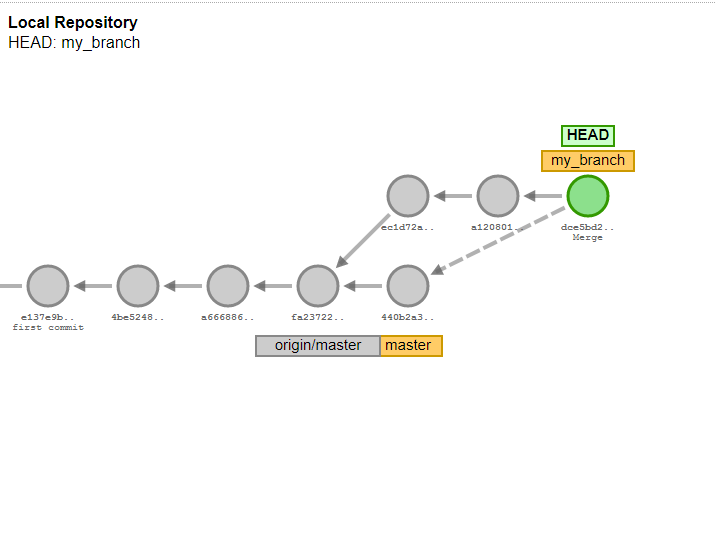
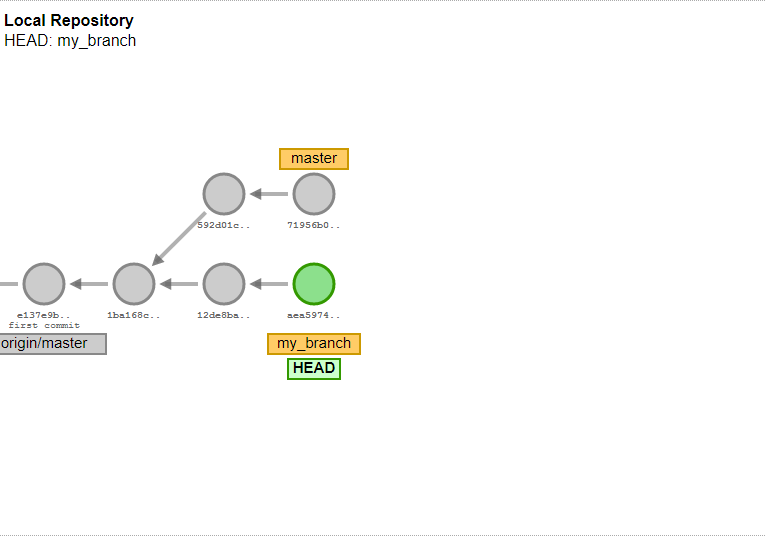
As practice you can try out everything online here: http://git-school.github.io/visualizing-git/

What’s the purpose of GIT?

The purpose of GIT is to make it possible to have multiple developers to work on the same files and let’s them share their results with each other in a safe and comfortable way. Furthermore GIT is tracking the changes, so you can anytime change to any older version.
A big advantage of GIT is that you are able to work totally offline. You need to be online only during the time of synchronization with the so called remote repository. GIT is also running on multiple platforms. GIT runs is a command line tool by default, but there are thousands of GUI tools which can be used.

Communication with remote in GIT

The main logic is that there is a so called remote repository. It can be created by calling git init --bare. This repository will be cloned to multiple computers (ex. for each developer). This step can be done by git clone command. After git clone you will have the latest state of the remote repository on your computer.
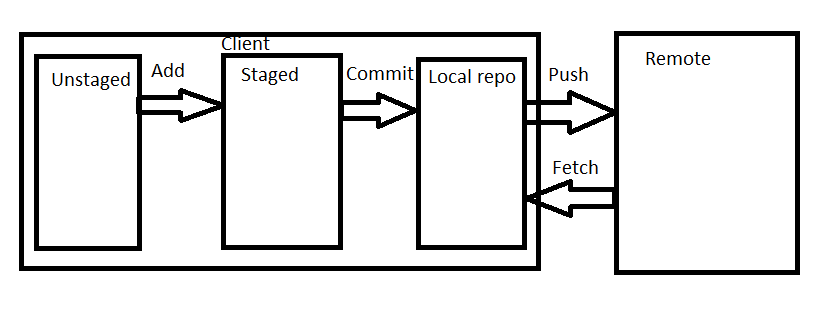
At this point you can start to make changes on the code, at this step these changes existing only on your local and they are so called unstaged changes. The changes which you want to keep needs to be staged by git add command. This will move your changes to the staged changes. At this point we are still not done, it is still not really part of you local GIT repository.
First you need to do a GIT commit. A commit contains several changes which are belonging together. It can contain changes also in multiple files. If you are calling the git commit command it is creating a commit of all staged changes. A commit is also a snapshot of a version of your code, you can any time switch back to that version later. Once you commited you can call git log, this command is listing the commits of the repository started by the last commit which should be your commit in this case.
This is now part of your local git repository, but it is still not visible for the others. To make it visible to the others you need to push your changes to the remote. You can do it with git push. It is pushing all the changes which are existing in your repo, but not on the server, to the server.
To get the changes of other from the server you need to call git fetch. This command is getting all changes from the remote which you still don’t have. But it is important that it is still not overwriting the current code on your side. To be able to do that you need to do a git merge. Later we will see in details what it exactly means. Since git fetch and git merge are mostly used together there is one more git command: git pull, which is equals to git fetch + git merge. Most of the cases programmers are simple using this command.
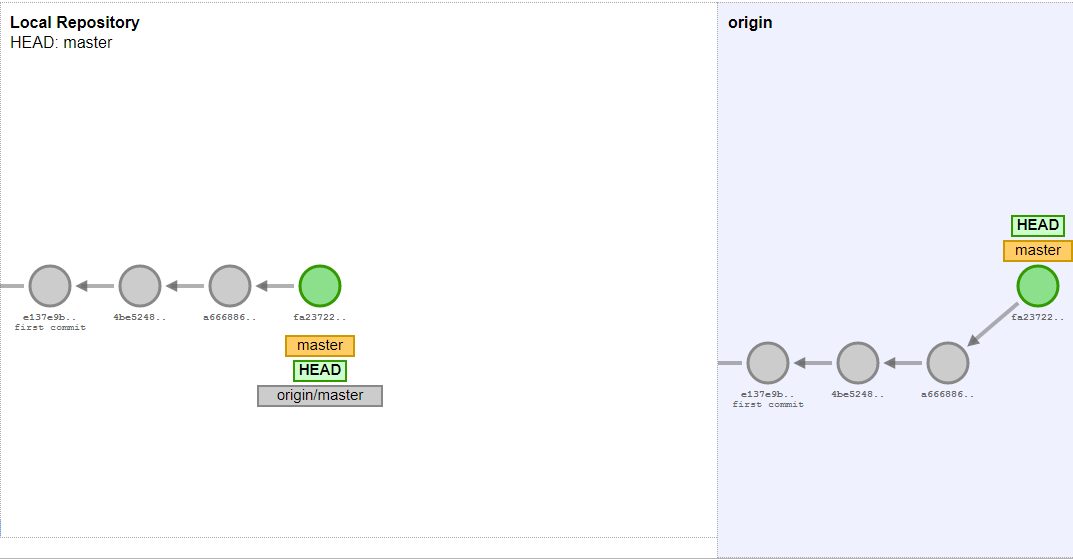
As a summary I played a bit with paint and created this picture:

What is a commit?

In GIT each commit has a content, which is a collection of changes in the repo. It also has a commit message which is the description of the commit. You need to add it at using git commit. A commit has also a hash key, this is auto generated and it is the identifier of the commit. The commit has also a parent, which is the hash of one (or more) git commits. By using git commit operation such a commit will be generated, the parent is automatically your current HEAD commit.

How are commits connected to each other?

The idea is easy, whenever you have new changes you are creating a commit and pushing it, so it is available for the others. But how to know which comment is the last one? Normally each commit knows its parent and the commits are in a chain. In this case the situation is easy. But sometimes the situation becomes more complicated.

Branches

Let’s see the situation if there are multiple commits with the same parent. It can be the case if when two colleagues are working on two different features based on the same commit. And both of these commit has also a child commit and so on. This is quite typical, but if you have a lot of such kind of “branches” in your git history it will become a chaos. To resolve it you can introduce branches. A branch is nothing else then a named label (or pointer) to a commit. The main branch is called as master by default. The branch master always points to the last commit of your main chain. You can anytime create a new branch, a new named label to your current commit by calling git branch branch_name. So that later you can always get that commit by git checkout branch_name. You can list all local branches by git branch -l and delete any branch by git branch -D branch_name. What is important that if there will be a child commit of your branch (a commit which parent is the labeled commit) then the branch label will point to this child commit. With other words: it is pointing always to the latest commit of your branch in the history. Thanks for that you can also push or fetch only a specific branch.

Merge commits

Now let’s make the example: you and your colleague are working on two features, you started in the same time, you are based on the same commit. Both of you are working and then pushing your new code. So you will have two commits with the same parent, but none of them will contain all the features. How to resolve this problem?

Simple you should create a commit which contains both changes. It is called as a merge commit in GIT. A merge commit has two parents. Luckily the biggest part of the work is done by GIT, it can take over the changes from both commit. You can reach this functionality by calling git merge.

When the same piece of code has been modified in both commit GIT can not decide which version is the correct. This is called merge conflict. Git will let you know which files contain merge conflicts. In that case it will show you both versions in the file. You need to manually open these files, remove the not needed version, save it and call git add for the file. Once all merge conflicts are resolved you should type git merge --continue.

Ammend commits

There’s a way to change an already existing commit. To do that you need to checkout the commit. Make your changes, stage your changes by git add and as you are commiting commit with command git commit --amend. In this case your changes will be applied for your current commit. But pay attention, it can be dangerous if different people has the same commit with different content on their local. So try to avoid this method.
You also need to know that technically

How to move commits?

There’s also a possibility to move one or more commit between the branches, remove commits from the chain or change the order of commit.

Rebase

Rebasing means changing the parent of a commit or a branch. First you need to checkout the branch you would like to rebase. Then git rebase new_base, where new_base can be a commit or a branch name. It will change the parent of the branch to the top of the given branch. It also means that all changes will be applied for our commits which are in the new base. At rebasing conflicts can happen as well. They can be resolved in the same way as at merging. Pay attention, no consistent usage of merging and rebasing can easily end up in a chaos.

Interactive rebase

Interactive rebase is a very advanced opportunity. With that you can squash multiple commits into one, drop existing commits, change the commit order etc. You can do it by typing git rebase --interactive HEAD~10, where 10 mean that you would like to make changes in the last 10 commits (of course you can add any number). After typing this command you will see the list of the commits with the pick keyword at the start of the line. Below you will see the possible keywords. The most important is maybe drop, which can just remove a commit and squash which is melding it to the previous commit. It can be useful if we have a lot of small commits and we would like to clean up the history a bit. If you are changing the order of these lines the order of commits will also change. Once you are saving this text file the changes will be applied. Of course conflicts can appear, you can resolve them as usual.

Cherry-pick

Witch git cherry-pick you can apply the changes in one specific commit to another branch. It can be useful if you need only one or two commits from another branch.  You need to checkout the branch you would like the apply the changes to. The type simple git cherry-pick commit_id.

Other useful features

There are some other useful possibilities which can make your life easier at using git.

Git reflog

Git reflog is storying all steps you did in your local repository. You can reach it by git reflog. It will list every step you did. You can step back to any state by checking out the commit_id mentioned at the start of the lines. It is an opportunity to do an undo if you made a mistake.

Git stash

With git stash you can do a local save of changes. It can be useful when you would like to change to another branch or commit, but you don’t want to commit your current changes. Type simply git stash and it will save your local changes. You can do multiple times git stash, it will store each changes separately in a stack structure. You can list your stashed changes by calling git stash list and you can get them again by git stash pop.

Useful tools

There are thousands of tools you can use for GIT. However a lot of programmers prefers to do everything from the command line, there are different situation when a graphical overview helps a lot. I will mention my two favourite tool, which are also quite commonly used.

Gitk

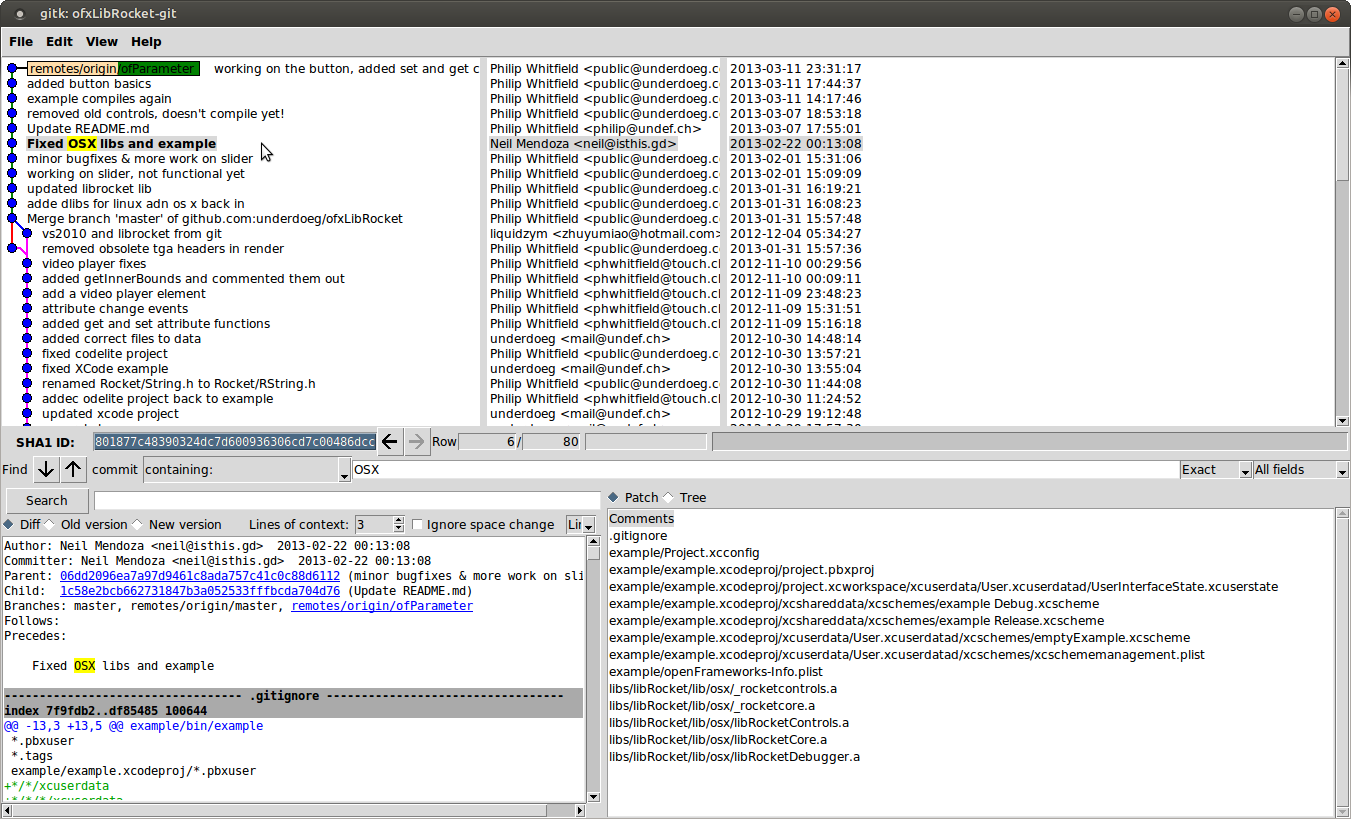
Gitk is a nice tool to visualize your history (git log) and the changes in each commit for you.

Git GUI

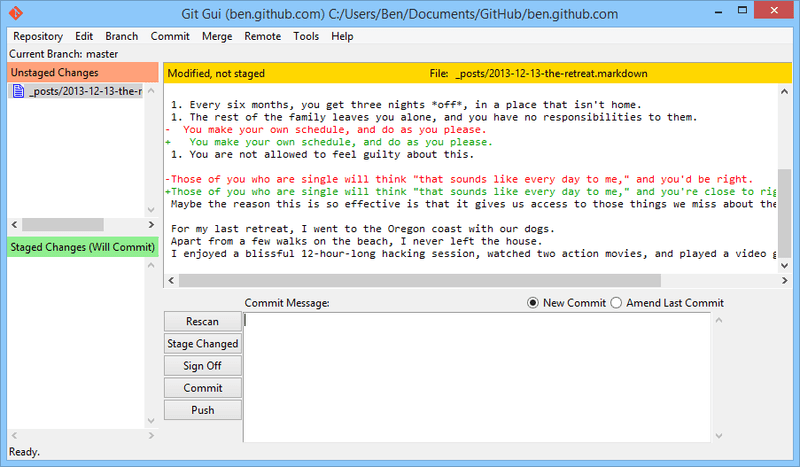
Git GUI is a great tool to stage and commit your changes in an easy way.


5/10/2019

16 points which motivates programmers

For programmers motivation is really important. It can make their effectivity much higher and it can make them loyal to the company. That means motivation is money. Motivating programmers also costs money, but it is done properly then it makes more benefit on long term. There are things which are difficult to change: topic of the project, due dates etc. But there are several things which are easy to change, several of them does not cost anything. This point is not only for managers, who have usually the power to change these things, it is also for developers to make initiative or to be able to choose the best work environment for themselves. You need to take into account, that motivation is like health: if it is there no one realizes it, but if there’s a lack of that it generates terrible issues. Let’s see the points

  1. Regular feedback session
    Everyone need a feedback about his job, even if it is good and even if it is bad. It simple makes it feel that it is important what they are doing and suggestions about how to make it better are always welcomed. Try always give positive and negative points in the same time, not only one of them. As a programmer you can ask your manager for a feedback session any time. It costs nothing, but some short time.


  1. Doable goals

    It is nice to set some goals for the developers: learn a new technology, reach project goals, make the development more effective (for example by creating tools). It is important that it should be doable inside the given time frame without a lot of stress. The topic of the goal should be something which is also wanted by the developer, that’s what is making the motivation. At some companies there’s a certain time frame every month to work on such topics. If your manager is not  cooperating in such activities you can set up such goals for yourself. It cost nothing but some short time.


  1. Opportunity for trainings
    A programmer needs to learn always about new technologies, soft skills etc. The working environment need to support it by providing trainings, books, e-learning courses etc. It has some costs but it has also a lot of benefits. Costs can be kept low by organising the trainings internally held by more experienced colleagues of the company. You as a developer can always offer the do such trainings for the team and handle all these trainings as an opportunity to learn something new.
  2. The freedom to choose the trainings
    It is also important that the developer needs to have the freedom the decide what he wants to learn and which trainings he want to attend. To push someone to a training is never a good idea.

  3. Flexibility in work place and hours

    For most of the working models home office and flexible working hours are total doable with some limitations (core hours, maximum allowed of home office days/week etc.). And the best: it costs nothing. Let the developers live with these opportunities.


  1. Career opportunities
    It makes a lot of developers to get new roles in the future: senior developer, software integrator, mentor of new colleagues, software architect, technical lead, team lead, project manager etc. So your environment needs to have a lot of well-defined role which are not meaning a new level in the hierarchy in all case, just some additional responsibility and give the developers to get such roles in case of fulfilling certain requirements. It costs nothing, but increases the motivation of a lot of people. It is important to know that salary and career are most of the cases not correlating. In a lot of cases being leader at a small company pays less than being a simple developer a big/better working company. It’s always up to the situation of the company.
  2. Opportunity to change between projects
    To work always on the same project can be boring. Let’s give the opportunity to the developers to change project if they want to change.

  3. Free fruits and coffee
    It costs less than 1% of the salaries, but it makes developers much happier if they have free fruit, coffee, tee etc. in the kitchen. Then why not?
  4. Proper technical environment
    It makes people really demotivating if you are always need to wait because of your slow computer, your build is also failing due to a buggy build system, it in uncomfortable to work because of too small display or simple having a slow internet connection. Always try to avoid all such issues to keep the team motivated.
  5. Good IT support
    It is making developers mad if they are wasting too much time with solving IT issues: install programs, setup printers, configure the network etc. Let’s have a proper IT team who can overtake all of these tasks.
  6. Team events
    Every team needs sometimes team events when they can get known each other better. It is always making them motivated. And the best: at a point they will anyway start to talk about work. So let’s organise such events. You can organise such events for your team as a developer as well.
  7. Competitive salary
    Of course salary is also important. More is better, but what is important: it shouldn’t be much less than the market average with the specific skill set. Because in that case people will leave even if everything else is fine.

  8. Freedom
    Give as much freedom to the developers as possible. It makes them use their creativity and it will make a lot of benefits on long term.
  9. Challenging projects
It is of course important for everyone on which project they are working on. The main goal here is that the project should be challenging. A project which is challenging for one programmer is not necessarily challenging for an other one. It is something to pay attention at resource allocation.
  1. Modern technologies
Try to avoid the usage of technologies from the stone age. Try to always use the newest version of tools and languages.
  1. Clean source code
    Everyone hates to work with spaghetti code. So keep your codebase clean to keep the developers motivated.

After finishing this list I realized that this list is also good to evaluate workplaces and opportunities. So before starting somewhere try to get information about these points and it can help you to make the right decision.

What is motivating you as a programmer? Did I miss something?

5/02/2019

How to talk about technical topics to other developers?

The most important soft skill for developers is the clear and effective communication. There are several situation when this skill is really needed. It is simply because the most of the projects is done is a kind of team work, so you need to simple talk to the other team members. One usual topic is to discuss about technical topics. Unfortunately a lot of developers are missing such skills and that’s why team work is becoming non effective in several cases. Let’s see how should these discussions to be done.

Why to talk about technical topics?

I often meet developers who think that it is simple a waste of time to talk about technical topics, just let them work and they will implement everything. This way of thinking is really not fitting to the modern ways of software development. First of all it is totally against teamwork. Additionally at a company usually the developers have different levels of knowledge in different topics, so really often knowledge transport is needed: you need to ask more experience colleagues for better solutions and you need to teach the less experienced ones to let them work more effectively.
The other point is that it is not always trivial to find the best technical solution for a problem. This topic is totally not black and white. For most of the solutions you can not tell that this is better, than the other, because it is not a scalar topic. Most of the cases you can tell for example, that this solution is better in runtime, than the other, but the other solution is using less memory. In our current situations we don’t have issues with the runtime, but we have a lack of memory, so let’s choose the second solution.
To be able to talk on this level you need multiple alternative solutions with all pro and cons. And to collect these ideas usually you need to talk about them, to talk a lot.
There’s also a point at quality: to improve software quality reviews are part of the daily work and at reviews you need be able to describe in an effective way why do you think that your solution is good or why do you think that the used solution is not good.
That means communication about technical topics is part of your daily work, if you don’t want to waste so much time you should learn how to do it in an effective way.

How to coach colleagues?

Typical situation that there’s someone at the company who has really good experience with a specific topic and he needs to support the other colleagues working with this topic.
In this case you need to do technical coaching to the others to support them to finish their work. It is also important for you that they are able to finish their work and it is also important that they are understanding the how and the why and they are not asking the same questions in two weeks again.
In this situation first try to understand what if the level of knowledge of the others. You can easily do it by some nice questions: “Do you know how this and this is working?”. But important: don’t try to make them feel that they are stupid just because they have a lack of knowledge. After that try to clarify the theory with all the reasons what are you doing and why. Once it is done do an example or a small part of work together, but don’t finish the work together, let them try it on their own, but stay always open for questions.
For coaching pair programming is also a good approach. Sit together in front of the computer. First you should do it and clarify each step. After a while let's change but still tell what should be done. With time you need to talk less and your partner needs to talk more.

How to ask colleagues for support?

The next situation is you are blocked in work and you need support from someone more experienced in the topic. First of all don’t ask as soon as you’re facing with difficulties. First try to understand what is exactly the problem and why is it not working. Also search for that in google and check for possible solutions online. If you can not find a working solution within a certain time don’t waste your time anymore, ask for search. Before asking for search try to summary what is really you problem and your question. Make sure if the chosen colleagues has some free minutes and he can listen to your problem. When you are asking don’t waste in details, because if you are giving a lot of unnecessary information it will be more difficult to understand your problem. But also take care about enough details. I got questions really often in a similar way, like: “I would like to push a shared_ptr as parameter and it is not working”. Ok, come on, why are you pushing the shared_ptr? Shared_ptr of which type? Is is const? What does it mean, it is not working? But the best if you are showing simple your code and clarifying what is your goal. If your code is far too complicated try to create a minimal example where the issue appears by removing irrelevant code part. You also need to understand that even if the other one is expert of the topic, he needs to understand your goal and problem first and it is not so easy.

How to ensure colleagues about your idea?

Also really typical if you have an idea about how to do something. It is always good to discuss about that with your teammates before implementation, since it is possible that even if you think it is a good idea in practice it has some disadvantages which are still not clear for you. It is also important if the other have other solutions listen to them, let’s try to understand their purpose and let’s try to understand what are its advantages over your solution. Then try to think what are the possible disadvantages and point out them. If you are talking about your idea first describe what is the problem to be solved and what are its main challenges. If it’s clear for everyone you should tell your idea step by step. At the end you can point out why do you think that it is a good solution, but you should also mention if you see some disadvantages. It is also good if you are talking about alternative solutions and at the end you are telling which one seems to be the best for you. If the others are criticizing your solution try to understand their reasons and ask them for suggestions. If your idea is to complicated it is good to create some diagrams of minimum working code example.

How to give a feedback about a technical solution?

If you are on the other side and one of your colleague is talking you about his idea it is also not always easy to answer in the right way. If you agree with the solution then it is easy, underwise it can be difficult.
Even if you think that the idea is super stupid you need to trust your colleague and his idea. You need to first understand his idea fully and also the reason why he is suggesting it. If you still think it is not the right way just point out why you are feeling uncomfortable with the solution (what are your fears) and try to give some solutions how these issues could be resolved. Never forget to mention the parts of the solution which you like. For example:
“This solution would really be well-structured and clear, but I think there are some corner cases when it wouldn’t work correctly. But if you are changing this part to that it would do what is required.” Something like this.

Summary


Communication is never easy, especially between developers and about technical topics. Try to always use the rules of assertive communication, give reasons and trust the others and you will see, it will work and it can really burst your career.

How I prepared my first online course

Since long I didn't publish anything here. It's because I was busy with some other topics, but now it's time to share the result...