Showing posts with label softwarequality. Show all posts

12/27/2018

How to write a really object oriented program

Introduction

As I started to do interviews with new candidates to our team I just realised that object oriented programming is topic which is really not clear for most of the people. For the question: “Do you know what is object oriented programming?” I usually got the answer: yes. For the follow up question: “Could you shortly tell me what is it?” I never got twice the same answer. I got a lot of good answers and a lot of answers which were not really matching with my understanding. And at a point I started to think about how I would answer this question and I realised that it is not easy at all.
There was an other example: I needed to reuse an already existing C++ code for my component. It was basically one class with around 200 functions and 100 variables, all of them were public and it was pretty unclear what they are standing for. After an analysis I just figured out that I can not reuse it as it is, because of multiple reasons:
  • it was using a third party logger, which I did not want to include to my project
  • The program which was using it originally were based on TCP/IP communication. Most of the functions were throwing exceptions if the TCP communication was not set up properly even if they had nothing to do with that
  • Some of the member variables were used in multiple functions with totally different purposes. So if you wanted to call a member function from outside first you needed to set up ca. 10 member variables to the correct values to be able to get some results from the function.
All things considered I just decided to refactor this piece of code before reusing it and it took me a long time to figure out how to do it, because a lot of functions needed to be decoupled to a separate class and it needed to be figured out what effects are made by each variable for the different functions. It was a nightmare. As the customer asked me why this refactoring was needed I just replied: “Because it was not implemented in an object oriented way.”. At this point he told me: “Why not, it was all implemented inside a class, so it was object oriented.”. OK, from technical point of view it was implemented inside a class, so it was object oriented, on the other hand it was not following anything what means object oriented programming for me.
In this article I’d like to show you that object oriented programming is not just about using the related programming language elements, it is something much more than that. In my view you can also do object oriented programming in languages which are not supporting that officially (like C) and you can also work in a non object oriented way in pure OOP languages (like Java or C#). Let me show you my understanding about OOP.

Principles of Object Oriented Programming

First of all let’s see the official definition of OOP. I found a clear definition here: https://www.techopedia.com/definition/3235/object-oriented-programming-oop

It says:
“Object-oriented programming (OOP) is a software programming model constructed around objects. This model compartmentalizes data into objects (data fields) and describes object contents and behavior through the declaration of classes (methods).

OOP features include the following:
  • Encapsulation: This makes the program structure easier to manage because each object’s implementation and state are hidden behind well-defined boundaries.

  • Polymorphism: This means abstract entities are implemented in multiple ways.

  • Inheritance: This refers to the hierarchical arrangement of implementation fragments.
Object-oriented programming allows for simplified programming. Its benefits include reusability, refactoring, extensibility, maintenance and efficiency.”
Let’s stuck first at the features:


  • Encapsulation: I think this is the most important one. Each of the objects has a state which is hidden for other objects. And on the the other hand there is an “implementation” for each object. I understand under that the member functions of the objects. And the state and the implementation together is one unit or with OOP terminology one object. So if your object is a rectangle it will have a state with elements like width, high, position, colour etc. And it will have an implementation, implemented member functions, like: move, resize, paint etc. And this is one object, not less, not more.

  • Inheritance: I would mention it before the polymorphism, because otherwise it is difficult to understand it. Inheritance stands for the connection between parent/child classes alias base/inherited classes. So for each class you can define so called child classes which can do everything what the base class can to (has the same public methods and member variables), but it can overdefine the implementation of the methods and it can extend the functionality (introduce new member functions and member variables). For example you have a class for animals. Each animal can move itself. But how they can move themselves if different for each animal. So the different animals will be inherited from the Animal base class and will override the implementation of move method. Plus some animals have some extra skills, like a dog can bark. So you can define a bark method for the Dog class.

  • Polymorphism: This is exactly what I told about the move method of the animals. You can have for example a collection of animals and you can call the move method for each of them and you shouldn’t mind how it is implemented for the animal.
That’s the official theory. Let’s go further with some practical theory.

Objects and classes and the connections between them

From the name of object oriented programming we can see, that objects are the basic units behind this paradigm. The next important feature is the class. But what is the relationship between objects and classes: class is in fact a collection, a template for similar objects, for objects with the same methods and member variables. So if you are having a rectangle, then you will have a rectangle object which is an instance of Rectangle class. The rectangle class define that it needs to have a size and a position and the object holds it’s exact size and position. There are programming languages (like JavaScript) where it is not needed to define the class of an object. In this case objects are created based on so called prototypes.
So when you are planning an object oriented program first you always need to think about what kind of classes will you need in your program.
The other important question is: what are the connections between these classes.
There are 4 types of connections between classes:
  • Composition:
    That means that the connected class is belonging to our class. They have the same lifetime (they are created and deleted in the same time). Our class can not work without the connected class. Like if we have a class called House and a class called Wall, then most likely there will be composition between them.
  • Aggregation:
    Aggregation between class A and B means that class A has an instance of class B. Like Car has an Owner. But the owner can exist also without the car, and the car can exist without the owner, the owner can change any time.
  • Association:
Association between class A and B means class A is using an instance of class B. Usually this relation between the objects is just a short term relationship, only during the run of the specific function. For example you have a class and it has a Log function. But this Log function needs an instance of the Logger class as a parameter. This is a typical example for association.
  • Inheritance/Generalisation:
This is the relation type already mentioned earlier. It means class A is a special case of class B. It’s also called as child/parent class as well.
So the next to do is to decide what kind of relations are there between your classes. It’s good to do some graphical modelling for your classes to have a better overview. For that the class diagram of UML is a good tool. I would propose to always do a plan of your classes at least on a paper before starting to program.
There are two additional definition I wanted to clarify:
State of the object: In fact this built up based on the current value of all member variables. So if you are changing at least one member variable the state of your object is also changing.
Public interface of the class: This is all the methods and variables which are public, which are visible from outside of the class.

Based on that you can do a plan of your needed classes, but there are still some so called “best practices” in OOP programming.

SOLID

These best practises are called SOLID. This stands for the followings:
  • Single responsibility principle
    Each of your classes should have a simple clear responsibility. You should be able to describe the purpose of the class with one sentence without using the words “and” and “or”. So yes: huge classes are most of the cases against this principle.
  • Open/closed principle
    Your code should be open for extensions, but closed for modifications.
  • Liskov substitution principle
    This is maybe a bit more complicated. But it means, that each of your parent classes can be replaced with any of its child classes without braking the functionality. This is coming from something called “Design by contract”. I plan to write a separate article about this topic.
  • Interface segregation principle
    Your interfaces shall be small and clear and having one well-specified purpose. So you should avoid having interfaces which are returning a lot of data. So the public interface of your class needs to be well designed and easy to use. Make everything public is not a good practise.
  • Dependency inversion principle
    You should design your classes your classes in a way, that the classes which are dependencies of your class can be set through some setter functions or constructor parameters. So that you can change them to any subtype later on. So for example if you have a Logger class which is used to create log files and you are can change it though a setter function you can change your Logger between an XMLLogger, a JSONLogger or a SimpleLogger if all these classes are derived from the same Logger base class. It is also helpful if at unit testing you need to mock your dependencies.
Let me extend it with my own suggestions:
  • Always try to keep all member variables (so the state of your class) private and use setter and getter functions for more control
  • Always try to design a user friendly public interface for your class
  • Avoid the long parameter lists at your member functions, in that case always think about transforming some parameters to member variables if it really makes sense
  • Read about object oriented design patterns and try to use them always when it is possible

Object oriented programming in practise

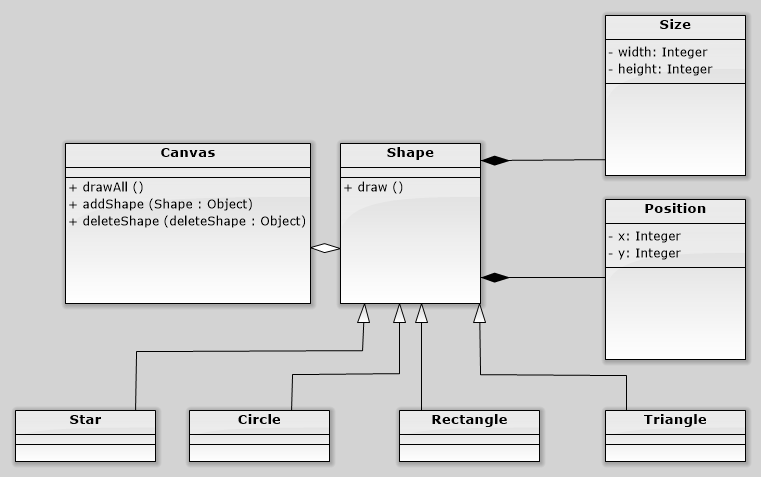
Now after getting familiar with all theory I wanted to include a short practical example. This is about implementing a Canvas which can visualise different shapes, like rectangle, circle, triangle and star.
A not really object oriented solution would be to create one Canvas class with member methods like: drawRectangle, drawCircle etc. But this solution is not nice, it is not using the features of object oriented programming and it makes difficult to extend your code (it is against open/closed principle).
Based on that my proposal would be the following:

Create a Canvas class. It should have a collection of shapes (aggregation with Shape class). It should also have member methods like addShape for adding new shapes or deleteShape for deleting already added shapes. It should have a drawAll function which draws all added shapes. Shape is a base class which has a draw method. Each shape has a (composition) size and a position. Position is a class with attributes for x and y coordinates. Size has a with and a height attribute. Each specific shape (Rectangle, Triangle, Circle and Star) are child classes of shape. So that each of them has a Position, a Size and all of them should implement the draw function. With this solution it is pretty to easy to extend the program with new shapes (just implement new child classes) of change the representation of position to other coordinate system.

This modelled and visualised in a UML class diagram should be something similar:
Summary


If you are an experienced software developer maybe I did not tell you anything new, but based on my experience a lot of programmers have a non-clear understanding about this topic, so I really hope I could help a lot of them. Based on my experience with this understanding you can ensure a much better quality for your work.

12/12/2018

The big testing guideline

Introduction
Based on my experiences for a lot a of people there’s a big chaos in their head about software testing, sometimes even for programmers and project managers. That’s why I decided to write a post which is giving a rough overview about the different ways of software testing.
As I started my carrier I was working for a small start-up. There software testing meant, that someone is starting the software, does some random clicks and checks if something strange happens or not. Later on I changed to automotive business. In this field testing is really strict. But all what I learnt: the software itself determines the right testing process. It is up to that: how safety critical is your software, who will use it, how complex is it etc.
There are several ways of testing, these methods can be either automated or manual, functional and non-functional, black box, grey box or white box  and it can be on several different levels (unit testing, component testing etc.). For each project you need to find the most fitting way of testing. Of course more methods you are using at testing there’s a lower chance to keep bug in the software (and this chance will never reach zero), on the other hand of course testing takes time, so it costs money as well. That’s why you need to find the most fitting way to your project. Now I will try to introduce you to the different ways of testing.

Functional and non-functional tests

Functional tests

A test can be either functional or non-functional. Functional test is usually against the functional requirements. Here you are basically checking if the functionality of your software is the same as the requested behaviour. You need always take care about corner cases as well.

Non-functional tests

Non-functional testing is going against the non-functional software requirements, it can go against the stability of the software, it can test if the software is running under each requested environment (operation system, web browser, different hardware etc.). Security test belongs to this category as well which is checking if your software is secure enough, it can be especially important in case of web based applications. Load test belongs here as well, which is testing how your software is reacting in case of large number of requests. Here you can test also the runtime of your software in the most critical scenarios (profiling) or the memory consumption. It can be also a usability test, where you are testing with the target users if your software is user friendly enough.

Automated and manual tests

Automated tests

Automated tests are normally so called “coded” tests. They are implemented once and can be run anytime later. Classical example is the unit testing of your code with some test frameworks (GTest, JUnit etc.). Other automated tests can be implemented with some testing frameworks (like Selenium) or with script languages (Python is also popular in this field). The common point here is that you are providing some inputs to your program, or to a piece of your program, then you are letting your program run and finally you are comparing the results with the so called expected results. The automated tests should be deterministic. That means with the same peace of code they should always pass or always fail. The big advantage of automated testing is that you can run such tests after each change of your code base and you can check if the changes were not breaking your already working functionality. For this reason you can integrate them to the continuous integration system, which is running your tests after each new commit once.
Automated tests can also be implemented parallel with your code, so you don’t need to wait with the test development for an already done software.

Manual tests

Manual tests are tests which can be done manually. So you are manually starting the program, doing some predefined steps and checking its behaviour. It is good to do such tests for functionality that you don’t want to test frequently or where it is difficult to test it in an automated way. What is important here: manual tests also needs to be done based on a test plan what is describing the different tests scenarios with exact test steps and expected behaviour.

Test categories based on knowledge about code

Black box test

In case of a black box test you have totally no knowledge about the code. You are just like a simple user, you are trying out the different functionality of the software, without considering its implementation details. For black box test is good to have a tester, who has really know knowledge about the implementation details of the software (so who didn’t take part in its development). Black box tests are usually done against the software requirements, which also needs to be well documented to be able to define good test cases. In case of a black box test you also need to think like a user. A black box test can be both automated or manual test.

White box test

In case of a white box test you have access to the whole code base and you are considering it at your test case definition as well. For example you know what are the exact parameters of your function and you know, that in case of a negative parameter value your function has to throw an exception then you should define such a test case. The most typical white box tests are unit tests, but you can do white box tests on different levels as well. It can be both automated and manual test. So that also counts as a white box test if you as the developer of your code you are trying out with a debugger how your code is behaving in case of specific inputs. One important counter at white box testing is called code coverage: it means how big percet of the lines of your code are really running when you are running all your tests.

Grey box test

In case of grey test you have limited knowledge about the code. For example you know what are the components, which interfaces are used, what are the parameters of the interfaces, but you have no idea about that how the component is implemented.

Levels of testing

There are different levels of testing from testing a small piece of code to testing the whole system. Each levels has their own advantages and disadvantages. Normally the advantage of lower level tests is that they can run faster and can show the root cause of the bug more precisely. On the other hand there are bugs which can be detected only by higher level tests, because they are caused by the wrong cooperation of different software components. But in case of higher level tests it is difficult to tell at a failing test case where is the root cause of the bug and normally they are running longer.

Unit test

Unit test is the lowest level of testing. Unit test is testing one unit. A unit should be small enough, most of the cases it is a function or a class. In case of unit testing you are really testing this small peace of code. To avoid to be influenced by other units other units can be mocked. That means you are changing them with code peaces with some fake/dummy behaviour. For such reason there are several mock frameworks, like Mockito or GMock. To be able to mock you need to have a clear and modulable code architecture. One common methodology to make mocking easy is called dependency injection.
A good unit test is small, fast, independent and testing one small piece of the code. Usually unit tests are automated but they can also be manual.
One more important method is called Test based development, where you are basically implementing your unit test cases parallel with your code.
Unit testing is usually done by the developer of the code. On long term it is useful to find regressions.
A good unit test is showing the exact place of the bug in case of failure, so that no long debugging is needed to fix your code.

Component test

Component test is about testing a component of your code. If your code is modular enough and it is organised into components with clear interfaces you can test these interfaces separately as well. This is a good candidate for grey box test. So you know what are the interfaces to be used (for example in case of a library) and you know what you are expecting from these interfaces, but you don’t know what is their exact implementation.

Integration test

Integration test are for testing how several components are working together with each other. Integration test can also detect bugs which are cause by the incorrect cooperation/connection of the components.

System test

System test is going against your whole system, so you software running on its target hardware in its target environment. These test are usually done as final tests, before the publication of the software. These should be done at each software release. This is usually a black box test, can be both manual or automated. This level of testing is usually done by an independent test team.

Who should test?

Regarding the question who should do the tests there are several different opinion. In case of classical testing approaches the rule is usually that the tester and the developer should be two different person. So if the developer was thinking in a wrong way or had a wrong understanding of the functionality the tester could still find the bugs. I think this is a good approach in case of higher level tests and usually in case of black box tests.
In case of modern testing approaches like test based development the tester and the developer is often the same person. This is passing well to the agile approach where all team member should be able to take over any kind of tasks (testing, development, design etc.). This approach is making the testing a bit faster, but based on my experiences it is also not so effective.
I think the most safe way is the aggregation of the two way: implementation of unit tests by the developer and testing on higher level with black box tests by an independent team. But in case of all development it needs to be considered if it worth to take so much time for testing. In case of safety critical system like automotive development of development of an airplane software of course it makes sense. But in case of a web page or a game mobile app maybe it is not so important.

Testing in project lifecycle

In the classical development methodologies like waterfall of V-Model tests are coming clearly after the implementation. But the development of automated tests can be also done parallel with the development. At the places where such classical methodologies are followed the software is also done in a cyclic way. That means there are regular software releases and each released software should be tested. So until the development team is working on release N+1 the test team is testing the release N and is preparing automated tests for release N+1.
At agile development methodologies, like SCRUM or Kanban, test driven development is often followed. That means the unit tests and the implementation are being done parallel. What is important, that in case of agile development you can also do some higher level tests. You can handle it as a separate user story to implement such tests. Or it can also be that there’s a separate test team which is also working for example based on scrum and they are always testing the results of the development team some sprints later.
In case of both classical and agile approaches I think it is really important to integrate the automated tests into the CI system, so it is able to check regularly if the software is working properly. Of course in this case the tests needs to be also updated regularly up to the newly implemented requirements. Since to run all tests can take long it is good to setup your CI separately for the different levels of testing. Like run all unit tests in case of any new commit, run all component and integration tests every night and run all the tests at each software release.

Summary


I just realised during the writing that it is really a complex topic, so I think I couldn’t introduce everything detailed enough, but I hope I could give you a good overview. Since testing is done with different approaches and in different ways at different companies I’m almost sure that experienced tester would disagree with some of my points. It can happen, I’m also not a tester to be honest. I hope my article could help you.

11/29/2018

10 points for better software quality

Introduction

As bigger a project is, there’s more chance for quality issues. What can be these quality issues: too many bugs, too long runtime, too high memory usage, difficult to understand/difficult to modify coding style etc. These quality issues are making normally the user of your program unhappy, and the development slower. Unfortunately you can never rid of all quality issues, but you can avoid most of them by follow the points below. Of course these solutions costs a lot of time, but it is better to do this kind of effort in time and not loosing the same time with bug fixing.

1. Analysis of requirements

Before the start of development you need to make sure, that it is 100% clear what your program should do. Here of course you need to think about things like compatibility of the requirements with each other or if it is possible to implement all the requirements, are there any certain hardware limitations?
To be honest most of the bugs are coming from simple misunderstandings: the customer had a different understanding about the functionality as the developer.
That’s why it is good to document these requirements in a clearly written form and let the customer read them and accept them.

2. Software design

If the requirements are clear still don’t start with the coding. First think about the solution, about how it should be implemented? Which algorithms needs to be used? Which part of the code will be reusable? Which libraries could be used? How will the different components and classes communicate with each other? And so on…

With this kind of planning you can already find and avoid a lot of possible problems in the future. Document your design in form of text and/or UML diagrams.

3. Coding guideline
If multiple developers are working on the same code always have a coding guideline which defines the coding style to be used (naming of functions and variables, usage of brackets etc.). So that your code will have a uni formic style which is well-readable.

4. Regular reviews

Do design and code reviews with other team members. They can find easily the mistakes in your way of thinking or in your code code. Don’t let any piece of code be merged without a review on that.

5. Static code analysis

Use static code analyser tools. These tools are analysing your source code without running it. They can find a lot a of possible problems, like uninitialised variables, never satisfied conditions, unreachable code part and so on. They can check for coding style as well.

6. Unit tests

Implements unit test for you code. A good unit test is running fast and testing a small piece (unit) of your code. Unit tests can help to be sure in case of every change that you didn’t brake the already working functionality and they can help to understand for other programmers what your code is for, since from the unit tests they can see what is the expected behaviour.

7. Component and system tests

Don’t forget to do some higher level tests and the you component or system as it is. This is basically a black box test, so you are not doing it based on the code, but based on the requirements. You can easily check if your component is fulfilling the requirements or not. Think always about corner cases as well. These tests can be manual of automatised as well. Automatised tests have the advantage, that you can run the tests later any time.

8. Continuous integration

Setup a continuous integration server with a CI system (like Jenkins), let it to run nightly builds and check your code in case of each new change. You can integrate the static analyser and the automatised tests as well. So that after each commit you have an automated feedback if your software is working fine or not.

9. Bug tracking

Track you already found bugs in a bug tracker system (ex.: Mantis). For each bug document how to reproduce them and how it is differing from the expected behaviour. If one bug got fix you can shortly document the way of solution of the fix as well, to avoid the same kind of bugs in the future. With this method you will never forget about any bug.

10. Profiling and memory usage


To be able to maintain the performance of your software you need to measure it’s runtime regularly. For that you can any profiling tool. With this method you can also discover the part which are using the most runtime. You need to check the memory usage of your tool also. For such purposes always try to define the scenarios which are the most difficult one from computation point of view.

How I prepared my first online course

Since long I didn't publish anything here. It's because I was busy with some other topics, but now it's time to share the result...