1/15/2020

Difference between struct and class in C++

Introduction
A really popular question of the C++ interview is about the difference between struct and class. It seems to be an easy question, but there are multiple views to be considered.

Historical background

Let’s start with the historical view. C++ is based on the programming language C, which is not supporting the object oriented programming paradigm. So that there were no classes in C, only structs. And struct was nothing else than a data structure to be used to store variables of different types together.
Later on with C++ together with the object oriented programming support the keyword class has been introduced to represent the typical object oriented classes.
In C++ Struct has also been extended with time, so it is also possible to inherit structs from each other, change the visibility of the attributes and to add constructors, destructors and member functions.

Technical difference

What is then the exact difference?
Technically there’s only one difference between structs and classes: in a struct the default visibility is public, since in a class the default visibility is private.
There’s technically no other difference in C++.

Practical difference

The difference is more philosophical.
As I already mentioned struct is a collection, a record of data, which belongs somehow together. And nothing more.
Since class is a bit more, class represents something, which has an interface, a state and a behavior. The state is usually internal, not visible from outside, that’s why the default visibility is private. The state can be changed through the predefined interfaces, which are the public methods of the class. Furthermore the usually the class has an invariant which is a restriction on its possible states. In case of a class you have methods which are handling the attributes of the class together.

So my suggestion is: use struct if you need a simple data container of data which belongs together and use class for everything what is more complex, what involves more abstraction.

1/02/2020

You salary is less than it could be! - How to negotiate your salary at an interview?

Introduction
Most of the companies handle the salaries as a secret and it has a cause. I am pretty sure that you have colleagues whose knowledge, experience and performance is worse than yours and they earn more and you. And there are of course colleagues who are better, but earning less. How to be part of the first group and earning more than the others?
Of course this question has a lot of factors. You can ask your boss for a raise. It is also important to change the companies at the right time. But where you can win the most is the negotiation during the interview process. To expertise your skills in this activity first you have to understand the view of the other participants.

The view of the company

If a company is hiring for a new position that means they have some work to be done, so they are looking for someone, who has the right skills to overtake the position with a possible short ramp-up time. Usually they have a clear view which skills are required to overtake the position. It is also important for them who is supporting them on long term, since a new change has a lot of extra cost and effort. And of course they are looking for the cheapest well-working solution. They are either hiring someone who is owning all the skills or someone who is lacking some of the necessary skills, but can be trained fast. Of course the one having all the right skills can achieve the highest salary, since there are no extra costs for trainings.
On the other hand, the company can only see from your skills what you are showing through the interview process. To be honest here you can present yourself a bit better as you are by concentrating on the skills which are really required for the position.
But in the end, the company has always a planned salary for the position, but usually it if defined in a range. If you have all the needed skills you can reach the maximum of this range. But unfortunately most of the cases this range is not public.

The view of the recruiter

Really often you have are first negotiating your salary with an external recruiter. The only goal for this recruiter to let you join the new company, since they are paid after the successfully hired candidates. So the recruiter can go to the company with some prepaid facts: there’s this guy, with these skills, expecting such amount of salary. As lower is the salary expectation, higher is the chance that the company applies you and the recruiter gets the success-bonus. That’s why the recruiters try to ensure you that your expectations are too high. They are often using phrases like “this is the realistic salary” etc. Don’t believe them. You have other ways to figure out what is your realistic salary.

Your realistic salary

It is very important for you to figure out what is your realistic salary. It is up to the company, up to the position, up to the city and up to your skills, that’s why it is not easy to find the right range. It makes it more difficult that in most countries salary is handled as a sensible information. People don’t like to talk about that.
Don’t use your current salary as a reference, it can be that you are really underpaid, but it is also possible that you are changing to a place where your responsibility is less, so that your current salary is not a realistic target. If you are changing the city that can make a really big difference on the realistic salary.
The first source you can use is the internet. There are websites, like glassdoor which can give you a good base, based on the inputs of the others. But in several cases it has simply not enough, or only obsolete inputs, so that it is not telling you a realistic value, especially if you are checking a smaller company or a smaller city.
It also worth to read to feedback about the company on different pages, like google maps, etc. Just google the name of the company and the city. You can find there often information which is comparing the salaries to other companies.
The most efficient way is to ask others who changed their jobs recently. Don’t ask them about their new salary, but ask them about what they think, what would be a realistic salary for you. It can also give you some guess.
Before you start to negotiate your salary, you should have a range in your mind about your realistic salary and don’t accept anything that is below this range.

How to negotiate your salary?

First of all you should show your best side during the recruitment process. Send a well-prepared CV with do your best on the interviews.
You will be might asked for your current salary. Just answer that it’s a personal info. Do not share it. Then you will be asked for expected salary. At this point you have to tell the higher limit of the range what you just determined, maybe a bit more. Most likely they will try to offer a bit less. If that amount is still in the determined range and it is not much less than the amount you told you can expect it. If it is much less or it is out of the range just tell, that sorry it is too less, then you rather search for something else. You may be asked for what is the lowest salary you would accept. Here you should tell a number which is just a bit below the first amount you asked.
During this whole process be patient, friendly but self-confident and very determined. You should show yourself strong and professional. Avoid answers like “let me think about this offer”. That would show weak and unconfident.
The most important point: if the company can’t give you an offer which is fulfilling your expectations, just keep on searching. That’s why it is good if you are not in a hurry at job searching. That makes you more confident.
It is always good to do 2-3 interview processes parallel, so that you can choose the best offer in the end.

Summary


To negotiate the highest-possible salary is not easy at all and the worst part is that you can never be sure that you reached the possible maximum. But it makes sense to take some time to negotiate. Because a higher starter salary makes an effect on your whole career at that company.

12/18/2019

Introduction to UML

Introduction
What are we doing as software developers? Nothing else than translating the language of humans into the language of computers. The language of the humans is any spoken language, like English and the language of the computer is binary code. There’s a huge distance between the two. To achieve this huge distance we have to introduce some middle stages. One well known middle stage is the programming language itself: no one writes binary code, everyone uses some programming language. From this step to compiler (or in some cases the interpreter) will transform you code into a low level language (like Assembly) and then into binary code. But there is still a huge distance between the spoken human language and the programming language, it is a good idea to introduce some additional middle steps.
There are several options for such middle steps, some of them are closer to the human language and others are closer to the programming language. Examples for this middle stage are: writing informal requirement specification, writing formal specification (like design by contract), specifying your program by examples or model your program by UML.

What is UML?

UML is an abbreviation of Unified Modeling language. The history of UML started in the mid of the 90's and today we are at version 2.4.1. It has several alternative versions and extensions, like SysML. UML is modelling by using different types of diagrams. UML is the way of representation. Later on based on your goals you can draw UML diagrams by hand on a table or on a white board, by using paint or by using a professional UML editor. There are several UML editor tools, some of them are free for use (ex.: Umbrello), others costs a lot (ex.: Enterprise Architect). Some of them are just like a specialized drawing tool, others are including a lot of features, like version control, connections between diagrams or even code generation on a certain level.
I also tried out several free UML tools and it was really challenging to find one which can save the diagrams as pictures in a proper way and which can draw all types of diagrams in the standardized way.
The UML diagrams are categorized into two big groups: structural (or static) diagrams, which are representing the static architecture of the software and behavioural (or dynamic) diagrams, which are representing how your software works in different situations.
Below I made a short introduction into the most popular UML diagram types.

Different sorts of diagrams

Structural diagrams

The first big group of diagrams describe the structure of your software.

Component diagram

A component diagram stands for modelling the high level architecture or your code.
It’s main elements are the following:
  • Components (ex.: User interface and Business logic on the diagram)
  • Ports of components: ports are marked by a small rectangle on the side of a component (see “Attributes” on the side of User interface called). They are an interface to other components, basically a collection of provided interfaces.
  • Provided interface: provided interface is represented by a circle connected to the component. These are basically the interface functions of the component which can be reached from outside.
  • Required interface: it is represented by a half-circle connected to the component. That means the the components requires an interface provided by another component. So that required and provided interfaces can be connected to each other.

Class diagram

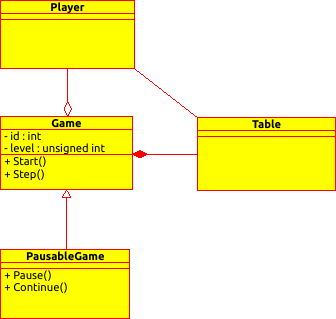
The most frequently used UML diagram is the class diagram. It is representing the class hierarchy of your program or a part of your program.
Each class is represented by a rectangle, the name of the class is written on the top of the class. To represent interface classes an additional rectangle should be put on the top right corner.
After the name of the class there’s a section for the attributes (variables) of the class. The visibility of the attribute can be represented by a - (private) or + (public). Then comes the name, “:” mark and the type of the attribute.
The next section represents the operations (functions and methods) of the class.
In several cases the class diagram simple ignores the attributes and/or the operations and concentrates only on the connection of different classes.
The classes can be connected to each other in four different ways:
  • Composition: it is represented by a filled and rotated rectangle on the side of the class connected to a different class (like between Game and Table). It means that Table is part of the Game, it is a part of it. They lifetime is the same (they are created and destroyed at the same time). Practically it means that Game has a member variable of an instance of Table. Multiplicity can be added by adding numbers on the connection (if the game had multiple players), * means “any amount” of connections. An example of the real world: between a human and its head, there’s a composition: they have the same lifetime and the had can not be assigned to someone else.
  • Aggregation: it is represented by an unfilled and rotated rectangle on the side of the class connected to a different class (like between Game and Player). It means that the classes are connected to each other, but they lifetime can differ. It means the Game has a Player. But the lifetime of a Player and Game is different and the Player can be assigned to different games as well or even the Game can change its Player during the time. Multiplicity is the same as for composition. In the world of code it means Game has a pointer to a Player. From real life it means that between my clothes and me there’s an aggregation: I need clothes, but I’m changing them regularly and even the clothes can be worn by others.
  • Association: association is marked by a single line between two classes. (like Player and Table), or sometimes with a single arrow. It means that the classes are using each other, but not owning, like they have a local instance in one of the functions, or it is used as a function parameter or return value. It is like if I take the bus, then I am just using the bus, it is a typical case of association.
  • Generalization: generalization is represented by a triangle-ended arrow (like between Game and PausableGame). It means that Game is a generalized version of PausableGame or with other words PausableGame is a specialized version of Game. In the world of code it usually means inheritance. And as for example for the real world: Animal in a generalized version of dogs and cats.

Object diagram

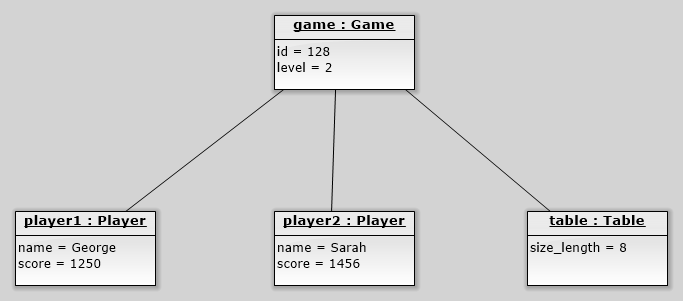
Object diagram is not so popular as class diagram, but it can also be really useful in some cases. It is representing the state of the objects (instances of classes) of an object oriented program in one dedicated point of time. Each object is represented by a rectangle. In the top part of the rectangle there’s the name of the object (“player1”) : Type of the object (Player). Below that you can list the attributes of the objects with their actual value. The objects can be connected to each other (like game has two players and a table).

Deployment diagram

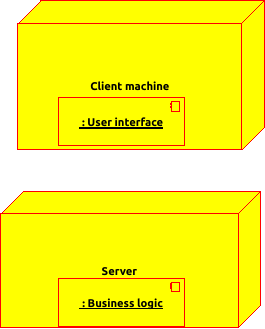
Deployment diagram is useful if your software is distributed on multiple different machines. You can add machines to the diagram (devices), like “Client machine” and “Server” on the picture and you can assign the software components to them which running on the given device.

Behavioural diagrams

The second big group of diagrams is the behavioural (dynamic) diagrams. Their purpose is to describe how the software behaves in different use cases.

Sequence diagram

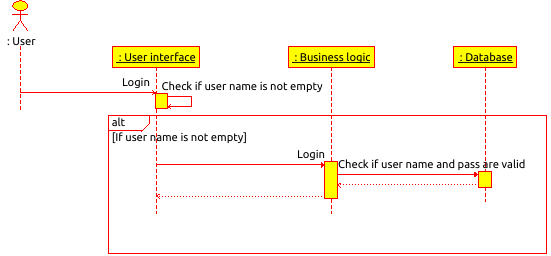
The sequence diagram describes the communication between the different object or software components in a dedicated use case.
The above example describes a login procedure in case of a web portal.
The first element in the top left corner is an actor, which represents the user itself. The user calls the Login method (clicks on the login button). The event will be handled by the user interface. This is represented by a rectangle. Here it is also possible to add an object : Type pair. The dashed line below is the life time of the object/component. In this case the life time is the same for all components, but it could differ from each other. It is also possible to create on object later by a dedicated call or destroy it earlier. In this case the life time line should of course shorter.
As the next step the user interface is calling itself to check if the user name form is not empty. After this call there’s a big red rectangle with the tag “alt” in the top left corner. This represents that the part inside the rectangle will be only executed if the condition “user name is not empty” is true. Otherwise it won’t run. Instead of alt we could also use a loop.
So if the given username is not empty the User interface calls the Business logic.
The business logic calls the Database to check if the username and password pair is correct. Then the database returns with a value (dotted line) and the Business logic also returns with a value.
Of course a sequence diagram can be done in a more or less detailed way.

Activity diagram

The diagram type called activity diagram is maybe the easiest one, since it is nothing else then a well formulated flow chart. The filled circle is always the start point of our program/algorithm. The flow of the program or algorithm is represented by arrows. The rounded rectangle (like “Ask for a number”) represents an activity. And the diamond represents a decision (in this case if the given number is positive). From the decision start always multiple arrows, which are labeled by the result of the decision (here Yes or No). In some representation there is also a merge element which is also a diamond. A merge element has always multiple incoming line and only one which is started from that. In this case I missed this element and I connected it back directly to the action “Ask for a number”.
The last element to mention is the filled circle inside the unfilled circle which is always the endpoint of the program of algorithm. A program can have multiple endpoints.
So the above diagram represents a short program which is keep on asking for a number until the given number is not positive.

State diagram

The state diagram is used to represent state machines. The start point and end point is represented similarly as in the activity diagram. The transmissions are represented by arrows. The dedicated states of the program are marked with rounded rectangles. The state machine can also have multiple end points. It is also possible to have parallel states or add substates to an already existing state. The advantage of this representation of your program is that it’s giving a good, human readable overview and at the same time, it's easy to convert it into source code.
The above diagram means that at the start of the program is in a “Not logged in” state, by logging in we can change to the “Logged in” state, from that by logging out we can change back to the “Not logged in” state. From both state we can reach the end state of the program.

Use case diagram

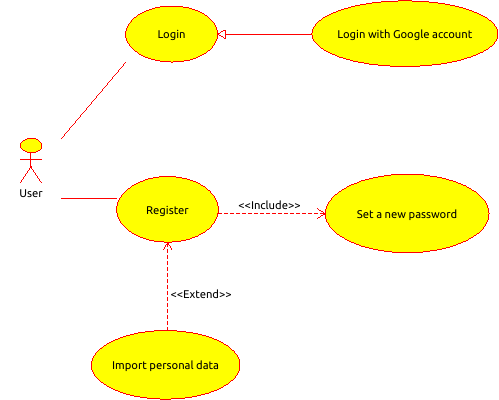
The use case diagram is any light weight representation of the functionality or a part of the functionality of the program from the view of the user.
The so called actor is represented by a stick figure, in the case of this diagram we call it “User”. It is also possible to have multiple actors (like users with different permissions) and it can also be the case that the actor doesn’t represent a human, but another system using our program.
The functionalities which can be used are called use cases. They are represented by an ellipse and they can be connected by a line directly to the actor or they can be also connected to an other use case by specific connectors. In case of the example we have to main use cases: Login and Register.
The connectors between use cases can be the followings:
  • Generalization: it is very similar as in the case of class diagram, it is even represented in the same way. The general use case can have one or more specialized versions. Like in the example the use case “Login” has a specialized version “Login with Google account”
  • Include: include connector means that one use case (functionality) is part of an other one. Like “Set a new password” is part of the functionality “Register”. It is represented by a dashed line with a label of <>.
  • Extend: Extend means that one use case is an extension of the other. For example the option of “Import personal data” is an extension of the use case “Register”. It is represented by a dashed line with a label of <>.
  • Precedes: One connector is missing from the example and this one is called precedes. By usage of precedes connector it is possible to define the order of the use cases. We could add a precedes connector between Register and Login, since to be able to log in first you have to register. It is represented by a dashed line with a label of <>.
Use case diagram is a perfect tool to represent the high level functionality of the program in a human readable way.

Summary


UML is a pretty strong tool to represent the software in a human readable format. It is a good basis also for technical discussions. However it should be considered that pretty often the same things are represented in different ways, since it is just semi-formal.

12/04/2019

How to do real teamwork in a software team

Introduction
Earlier programmers were lonely wolves, working alone on their ideas and projects. In the meanwhile the whole business became much faster, one of the biggest challenges is to deliver solutions in time. Most projects have a strict due date and the technology is changing so frequently, that you have to be really fast to do some meaningful innovation (and to be the first). Lonely wolves have no chance in such an environment. You can not do breakthroughs alone. The only possible way to catch up with the time pressure is to work in teams.
Nowadays most of the programmers are working in teams. This makes a lot of challenges, since next to good technical skills, good soft skills are also required.
Do the developers do real teamwork nowadays? Could they be more efficient by working closer to each other?

Assignment of tasks

At most of the companies I used to work the tasks were assigned to dedicated developers. This assignment was usually done either by the project manager or by the most experienced developer (kind of technical lead). So every developer got their tasks and then they started to work on them.
There was a bunch of people, called team, and each of them was working on different tasks individually. Sometimes they had sync meetings where they mentioned some words about their task. But of course they couldn’t give a good overview on that for the others.
There was some team spirit of course: we went out together for lunch everyday and we did a lot of team building event which gave the feeling that we are really parts of a team and nevertheless we were working on the same project.
Of course if someone got stuck the others tried to help, but since they were not deeply in the topic of other tasks it usually took ages for them to understand the issue and even more to find a solution. So even if it was called teamwork, it was rather the work of a bunch of individuals who supported themselves sometimes.
It the root of the behavior was the assignment of the tasks. Each developer had their own tasks. They were responsible for that task. If the task was not done in time or with the right quality it was their responsibility. And if the task of their colleagues was not done in time, that was the responsibility of the colleague.
Just imagine the situation: you are a bit late with your task and your colleague asks you for support. You realize that the support would take a bit longer, which means a high risk on your task. Of course you won’t help, You will just give some quick guess how to fix the issue and that’s it. But at the end your task will be done, but the task of your colleague may be blocked right at the beginning, it will be very far from being done. So on the level of the project it is a pretty clearly worse situation that being a bit late on one task.
Later I changed to another company and other project where the mindset is much different. I experienced a totally different way of teamwork, which I found much more efficient, even if it has some cons. That’s what I will introduce now.
The main idea here is that the tasks are not assigned to individuals, but to the whole team of 8-9 developers. The team has a certain amount of tasks to be done within a dedicated time frame. Everyone can overtake any kind of task, so there’s no separation between the team members based on areas. And at the end the whole team is responsible for all of the tasks to be done on time with the right quality.
So that if one task if blocked, it’s important for all team members to find a solution as fast as possible.
Later on, of course the team can split the tasks to subtasks and assign these subtasks to individual, but still there’s a common goal to finish everything in time.
This attitude is also good in case of unplanned sickness and holidays: it is not blocking the whole work on the tasks for weeks, the team mates can overtake it, since the goal is still to finish everything.
This way of cooperation makes the workload more balanced: there are no people without tasks and people with too much to do. Once you have nothing to do, you take a look where you can help. If you are waiting for another part of the code, you won’t sit workless, you will help the one working on that part.
This attitude makes the whole development faster and more relaxed.

Knowledge transfer

To be able to work in such a way it is a must to be on the same knowledge level for the same team as much as possible. This method will never work if there is one guy who knows everything and the others have no clue about the task and the technical background.
Of course it’s rarely the case that the whole team has around the same knowledge. To be able to get closer to this point you should do a lot of knowledge transfer. The one who has better experience with one or the other topic should spread this knowledge within the team.
The very first step if to offer technical training for the team members in different topics to fill the big gaps. It is also needed to provide some time for the developers during their working hours to learn from the Internet, from books or from online trainings.
Additionally there should be some knowledge transfer more related to the tasks.
The first way to do it is to have regular knowledge transfer meetings where team members can present their challenges and solutions during their last tasks.
Next to that it is a good practice if the team members always take a look at the code of each other. But mainly the most important point: if you are blocked, if you don’t understand something: ask, ask and ask the others. Don’t let you have question marks in your head.
Other than this there are two more radical ways of knowledge transfer.
The first one called pair programming: a lot of developers don’t like it, they think that it is a waste of time, they feel uncomfortable to talk to others all day long. But it is really helping the flow of knowledge within the team. At the beginning I was also sceptical. But later on I realized its power.
It means two of you are sitting at the same computer and working on the same task. It is good to set up the pairs in a way, that one who has better experience with the topic and one who have less knowledge. So that the one with less knowledge will learn pretty fast. The idea is that one member of the pair is typing and the other one it telling what to do. To be efficient you should change frequently the roles.
On the other hand to do pair programming is exhausting. My suggestion is: don’t do it all the time, just if it’s necessary. You can start to solve the task in a pair and once it is clear for both parties how to resolve the task you can split it up into parts and continue to work separately.
The second way of knowledge transfer is a bit more radical. It is called mob-programming. That means a team of developers is working on the same task in front of the same computer. For that you need a huge display. There’s always a leader of the mob session. The leader of the mob session if the one who is typing on the keyboard. The leader should be changed after twenty minutes. This is a really efficient way to bring the whole team on the same level in one topic.
But the way how you are doing the knowledge transfer is always up to the team and the topic. One goal is to share the knowledge, the other one is feeling yourself comfortable. You have to find a way which satisfies both the points.

How is well-working team?

I collected some points, if they are satisfied, your team is doing a proper team work:
  • Every team member is aware of the common goals
  • Every team member knows what are the others working for and what is their status
  • Every team member is able to overtake any of the tasks
  • Every team member knows how last technical challenges has been resolved
  • If a team member is sick or has a vacation that has no big effect on the team performance
  • If one team member is leaving the team that has no big effect on the team performance
  • If one team member is leaving the team no additional knowledge transfer is needed
  • If a new team member joins the team, that doesn’t have a big effect on the team performance.
  • The decisions are made together
  • The responsibility is shared within the team
  • At any of the meeting any team members can take part (no need for one dedicated team member to join)
  • The team members enjoy working in the team

Evaluation and feedback loop

In case of classical team setups developers are evaluated based on their individual performance. In optimal case they also get regular feedback about their attitude and behavior.
For developers it is really important to have some realistic goals and to get a regular feedback if they are doing things in the right direction. In classical teams this feedback comes usually from the team manager, project manager or from the technical leader.
In case of close teamwork we have to make a difference between the two levels of feedback: the team level feedback and the individual level of feedback.
The team level of feedback should come from someone who is not part of the team: team manager, project manager or customer. This should be reflected on the common goals of the team, so that the team can find the points to be developed.
The individual level of feedback has two sources: the first one is nothing else, but the team. The team should have a way where team members can give feedback to each other. It can be feedback for the whole team, like “we should plan the tasks more properly” or “we should do more pair programming”. But it can also be on a personal level if there are issues with a team member. The form of that can be either a feedback meeting, where team members can tell their opinion in a structured way. Or it can also be done by filling out an anonymous questionnaire.
The other source of feedback should be still the management, who can help to find a direction for personal development, like improving dedicated skills, taking part in trainings etc. I think this part is still really necessary, since as human beings we need such a level of advice and feedback.

Biggest challenges of close teamwork

This way of working works properly in an ideal world. Fortunately this world do exist. But there are several points to be fulfilled: a customer agreeing with this working mode, a management supporting this working mode and team members who are agreeing with this working mode.
Furthermore it is necessary that all the team members have the right soft skills of communication and conflict management as well as that they can work well together. And this is the biggest challenge. A lot of software developers don’t like to communicate, don’t like the team work and some of them even doesn’t have the right skills to do it. For this kind of work team members need outstanding communication skills or at least average ones. That’s why it is a big challenge to set up such a team.
It is also important that the team members should have similar technical knowledge. It is really difficult to involve a total beginner junior into such a teamwork unless slowing done the team too much. This also means that the costs of developers with the right technical and soft skills is pretty high.
From a personal perspective I think the biggest challenge is to find a way of working which is fine for all team members. Next to that it is exhausting to cooperate all day long, but with time you use to have it. It also takes some time to feel comfortable with the shared responsibility.

Summary


To do real teamwork in a software development team has a lot of challenges, but even more benefits. Everyone should try it!

How I prepared my first online course

Since long I didn't publish anything here. It's because I was busy with some other topics, but now it's time to share the result...